













Toolbar has become history with Excel 2007
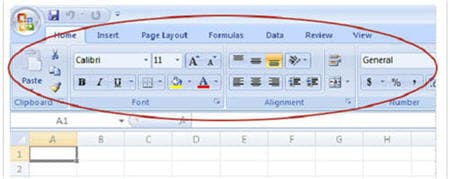
There is no more toolbar in Excel 2007.
The old look of Excel menus and buttons has been replaced with this new Ribbon, with Tabs you click to get to commands.
The Ribbon was developed to make Excel simpler to use, and to help you quickly find and work with the commands you need.
Tool and Commands are now more clearly visible and more readily available. You have one control
center — the Ribbon, which brings together the essentials and makes them very visual.
We will share with you more about the ribbons in next week lesson.
Lesson 01: Why learn Excel 2007?Lesson 02: A new look for Excel 2007 and access the “file menu”
New! Comments
Have your say about what you just read! Leave me a comment in the box below.
Share this page:
Enjoy this page? Please pay it forward. Here’s how…
Would you prefer to share this page with others by linking to it?
- Click on the HTML link code below.
- Copy and paste it, adding a note of your own, into your blog, a Web page, forums, a blog comment, your Facebook account, or anywhere that someone would find this page valuable.
<a href=”http://www.advanced-excel.com/”>Advanced Excel – From a Business Perspective</a><a href=”http://www.advanced-excel.com/”>Advanced Excel – From a Business Perspective</a>

Excel Courses for Business Professionals
Copyright © advanced-excel.com 2007 – 2019. All Rights Reserved. Privacy Policy
Microsoft® and Microsoft Excel® are registered trademarks of Microsoft Corporation.
advanced-excel.com is in no way associated with Microsoft