Subtotal Function
Subtotal function should not be mixed up with subtotal formula. Both are achieving simlar objectives but are different in nature. As a function, it is able to insert subtotal into different groups of data. As a formula, it can help you derive subtotal in filtered records. Subtotal formula works within a cell while the other works within a set of data. For example, subtotal function can calculate the total sales turnover for each industry group. Assuming you have a set of data records as shown below:
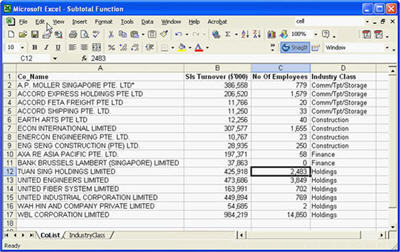
And you want to insert the total sales turnover, total employees below each industry class (Comm/Tpt/Storage, Construction, Finance, Holdings). For those who don’t know about this function, what they would have done is to insert rows manually after each category. Then use the sum formula to sum up the sales turnover and the total employees into the inserted rows.
There is an easier method and that is the subtotal function. Here is what you do.
1. Select a cell within the data set.
2. Go to Menu, select data -> Subtotal.
3. The following dialog box will appear
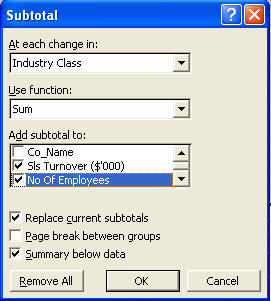
a. At each change in, select “Industry Class”. This is to indicate where should Excel insert the subtotal formula.
b. For Use function, choose “Sum”. You can use a number of functions such as
i. Sum ii. Count iii. Average iv. Max v. Min vi. Product vii. Count Num viii. StdDev ix. StdDevp x. Var xi. Varp
c.In the Add Subtotal to section, check the box on Sls Turnover ($’000) and No of Employees. These are the items that would be sum up at the end of the subtotal function.
d. Replace current subtotal as the description implies will replace any previous subtotals. In our case, this is the first subtotal and therefore, it has no effect in the function.
e. The subtotal function will also insert a page break after every category, namely Comm/Tpt/Storage, Construction, Finance, Holdings.
f. Summary below data will place the subtotal below the data. If the option is unchecked. The grand total and the subtotal will appear at the top of the data.
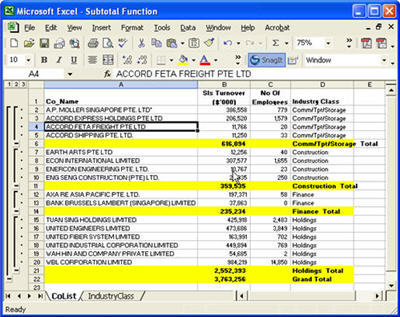
4. Click OK and you will get the result given below. (PS: I have highlighted the subtotals so that you can see the effect of the subtotal)