















Auto resizeable range with Offset function
Resizeable range is commonly known as the dynamic range in other Excel sites. With the range, we will no longer need to resize the data source for Pivot tables. Before we learn how to set up one, let’s first understand the offset function, the main component in resizeable range.
The offset formula will return the address of a cell if the width and height is set to 1. And it will return a range of cell if the width is set to more than 1. Using the counta formula, we will be able to measure the height (no of rows) and width (no of columns) of the database automatically. And if the counta formula is applied to the offset formula instead of entering a fixed number, we can a re-sizable range that varies based on the size of the database. Here is how the formula of a re-sizable range.
=Offset(A1,0,0,counta(A:A),counta(1:1))
In the above formula, the starting point of the database is A1. This is denoted by first the 3 parts of the Offset formula. In the fourth part, we used a counta formula to count the number of records in columns A, a mean to determine the height or number of rows of the database. In the same way, we use a counta formula for the fifth part to count the number of cells in row 1 to determine the number of columns in the database (Each column should have a field name).
Even though the formula will give an automatic resizeable range, the solution will not be complete without the steps that follow. This is because pivot table cannot accept formula in their range. But they can accept a range name and the range name can accept formula. Therefore, we have to create a range name and put the above formula into its reference.
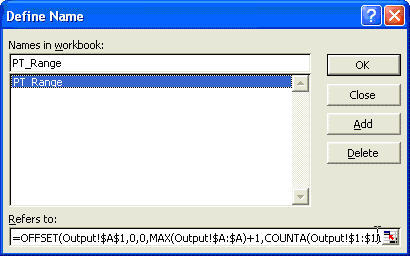
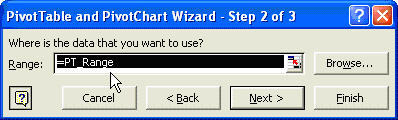
Then put the range name into the pivot table range when you are asked for the source range in Step 2 of 3 of the pivot table wizard.
New! Comments
Have your say about what you just read! Leave me a comment in the box below.
Share this page:
Enjoy this page? Please pay it forward. Here’s how…
Would you prefer to share this page with others by linking to it?
- Click on the HTML link code below.
- Copy and paste it, adding a note of your own, into your blog, a Web page, forums, a blog comment, your Facebook account, or anywhere that someone would find this page valuable.
<a href=”http://www.advanced-excel.com/”>Advanced Excel – From a Business Perspective</a><a href=”http://www.advanced-excel.com/”>Advanced Excel – From a Business Perspective</a>

Excel Courses for Business Professionals
Copyright © advanced-excel.com 2007 – 2019. All Rights Reserved. Privacy Policy
Microsoft® and Microsoft Excel® are registered trademarks of Microsoft Corporation.
advanced-excel.com is in no way associated with Microsoft
