
Calculate Present Value
Present value is a financial term used to define the value of a certain amount of money today. The present value of $1 today is $1. It you put $100 in the bank, that $100 will become $105 in one year time at an interest rate of 5%. $105 is the Future Value (FV) of the $100 in the first year, i.e. Year 1. If you continue to put the money ($105) in the bank, it will earn another 5% interest. Your bank account will have $110.25. That is the future value of your $100 today in year 2. If you notice, the future value is dependent on the interest rate offered by the bank. If the interest rate is 10%, the FV of your $100 in year 2 is higher. The amount is $121($100*1.1*1.1). It is equal to your original sum of $100
plus the interest for 2 years. Don’t forget that the interest you earn in the first year will also earn you interest in the second year too.
Assuming that you need to save $121 for some expenses two years from now, and you are interested to find out how much you would need to put into the bank today so that you will have $121 in the bank. As the bank is paying an interest rate of 10%, you know that you need to put in less today to obtain $121 in two years as a result of the interest your bank is paying you. That amount you are going to put in today is known as the present value. Microsoft® Excel is able to help you find out what is that amount with its present value formula. Here is the way to find out.
First present the numbers as shown in the diagram. It is known as the time line. It will help you clearly establish what you are going to calculate
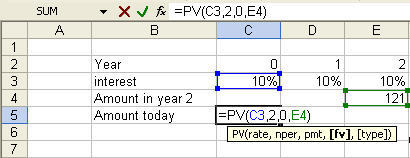
In Cell C5, enter the Excel formula �=PV(C3,2,0,E4)� excluding the inverted commas. The formula will calculate the amount you need to deposit into the bank today to earn $121 in 2 years time. We have to enter the interest rate the bank is paying you (C3), the number of years between now and the point you would like to receive the money (i.e.$121), any payments or receipts between the beginning and the ending period/year. Finally, the amount you expect to have some time in the future (in our case, it is $121 or the value in E5). Once you have entered the formula (as shown in the formula bar in the diagram above, press enter. Excel will return the value negative $100 which is the amount you have to put in today to make sure that it grows to $121 in two years� time. The amount is negative to indicate that the money is taken from you (and deposit into the bank) while a positive amount shows the amount you will receive later. The results which is called the present value will therefore shows you the amount of money you need to put in today in order to take back $121 in 2 years� time.
With this formula, you would not need to buy calculators specially designed to perform financial calculations. These calculators are know as financial calculators.
