















Edit Your Macro in Visual Basic Editor
To edit your macro, you have to go to the Visual Basic Editor (VBE). It is also the place for you to create and manage macros. This page will orientate you to the key elements you need to know about visual basic editor before your create or edit your macro.Having the right view will help you find out quickly where you have stored your codes, access the code directly, and also to find out the property of each object. An object could mean a worksheet, the entire workbook,
a userform or a folder called module where the macro codes are stored
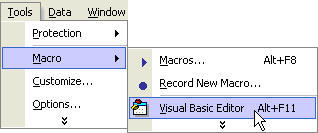
1. To open the VBE, go to Menu -> Tools -> Macro -> Visual Basic Editor
2. I recommend that you set up the visual basic editor to have the following views:
a. Project Explorer – contains the workbooks (including addins and personal macro workbook) that are opened in Microsoft Excel. In the diagram, we have an addin called PDFMaker.xla, a workbook called “Book1” and our personal workbook called “Personal.xls”.
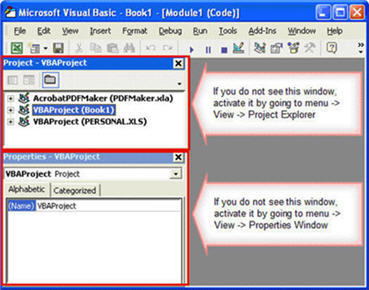
b. The properties window – will show the properties of the item within workbook or addin. If we select a worksheet found within a workbook (e.g. Book1) by click on the left mouse button over the “+” sign, we will see a list worksheets (e.g. Sheet1, Sheet2, etc). Selecting one of the worksheets will display the properties for that worksheet.
3. View the macros in details
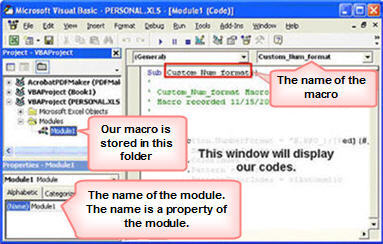
a. Move your mouse cursor to the project explorer and over the “+” sign on the left of project called “VBAProject(Personal.xls)”.
b. Click on left mouse button. You should see 2 folders, namely, Microsoft Excel Objects and Modules. Click on the Modules folder and you will see another folder called Macro1.
c. Double Click on Macro1 and the window on the right would pop up with the code to our recorded macro. This is the place where you will edit your macro
4. Where else can we store the macro?
a. You can also stored codes in the Microsoft® Excel Objects folder and the userform folder.
b. Excel Objects folder usually store codes that are triggered by an event in the workbook or worksheet. Examples of events are opening the workbook, activating the worksheets, selecting the cells in a worksheet, double click with the left mouse button, etc.
c. Userform folder is the location where we design a dialog box which we could interact with the users. The code stored in this folder is normally related to the items in the userform.
Do you have any question regarding edit your macro? Ask Jason Khoo.
New! Comments
Have your say about what you just read! Leave me a comment in the box below.
Share this page:
Enjoy this page? Please pay it forward. Here’s how…
Would you prefer to share this page with others by linking to it?
- Click on the HTML link code below.
- Copy and paste it, adding a note of your own, into your blog, a Web page, forums, a blog comment, your Facebook account, or anywhere that someone would find this page valuable.
<a href=”http://www.advanced-excel.com/”>Advanced Excel – From a Business Perspective</a><a href=”http://www.advanced-excel.com/”>Advanced Excel – From a Business Perspective</a>

Excel Courses for Business Professionals
Copyright © advanced-excel.com 2007 – 2019. All Rights Reserved. Privacy Policy
Microsoft® and Microsoft Excel® are registered trademarks of Microsoft Corporation.
advanced-excel.com is in no way associated with Microsoft
