
Free Excel Calendar Template DownloadHow do you like to have a powerful calendar that could be customised to your needs? A calendar that allows you to-put in your own pictures;-highlight important dates product launches, customers’ birthdays, a travel itinerary, duty roster, key dates for board meetings so that you will not missed them out in the midst of your busy schedule;-let anyone with a computer to open and use;-work on dates that goes beyond 2009 with a click of a button;-print on any printer;-use without having to spend a single cent on it.This Excel calendar is created by John Walkenbach, a Microsoft Excel expert. It is developed using formulas (no macros at all) and works in all versions of MS Excel, including the new Excel version 2007.With permission from John, I have added functionality to the template to highlight the public holidays in red just by entering the dates into the worksheet, and have demonstrated how this can be done by putting in the public holidays of Singapore. The formula is intelligent enough to mark out Monday as a public holiday if that public holiday happens to fall on a Sunday. Take a look at 9 August 2009, Singapore National Day and you will know what I mean.If you live in another country, all you have to do is to replace the list of public holidays with yours. I have also put in my excel course schedule so that you could see how I use it to highlight our training schedules for next year. Since it is an Excel file, you can create extra copies by saving it with another file name. You can create one for office use, another for personal use, etc.It is also capable of highlighting dates in a range so that you do not have to enter the dates one by one. All you have to do is to input the Start and End dates and Excel will take care of the rest for you. It’s that easy to use. You don’t have to be an Excel Master to use this template. The minimum requirement to use this template is opening and closing a workbook and enter dates into the cells.If you like to own a copy of this wonderful Excel template, fill up the form given below. It will be delivered to your mailbox almost instantly. If you don’t need one now, you can download it first and play around with it later. It’s going to show how much more you can do with Excel.Here’s some feedback from users
Thank You for the templates. I have published a family calendar with all the birthdays for each of the family members for a few years.I usually have downloaded the MS Excel template and added to it. With your template I have added the birthdays once and now for each year I will be able to produce the calendar without any extra effort.I am also an Excel fan and had never heard of the array formulas. I am enjoying studying what they can do.
Janice Wallis
Thanks for the initial Excel Calendar.Before going away I was busy ‘adapting’ to enable me to produce ‘refills’ for my At-A-Glance Calendar.This I have managed to do and am very pleased with the result! The only ‘negative’ thing I came across was that when using the conditional formatting for holidays and public dates, etc, if a date happened for both on the same day, one cancelled out the other!When I have time I will look to how that problem might be overcome!I am also interested in creating a calendar based on the A4 size month at a glance whereby information for personal birthdays and anniversaries can be entered along with public and bank holidays. I have a current excel programme but it is far too long winded as I did not have the ability to formulate as you have with your programme!
Mike Wilson
I am extremely pleased with your Excel Calendar Template (ECT). I have not used it for anything (yet), preferring to devour its rich formula construction first, before doing practical stuff with it.I spent the whole weekend breaking up each formula and recreating it. I had heard about Array Formulas and Conditional Formatting but had never got close to these features. To say that they are powerful is an understatement.Thank you for introducing me to this template. I am sure I will find several applications for them (I work in a banking/finance environment).Regards,
Lad
It is great and extremely useful. I am busy integrating it with a Excel report for sick leave management as to provide a visual calendar representation of sick leave taken by an individual over a twelve month period. This calendar provides the ability to establish sick leave taken on a Monday or Friday, before or after a public holiday as well as on a birthday of the employee or his/her dependants. It is a pity that conditional formatting does not make provision for a fourth condition. I use the public holidays as well as birthdays on the file and changed the school terms to sick leave incidents. I would have loved to include the school terms (but would have used it as school holidays) to see whether sick leave is more prominent during school holidays than during school terms.I am also using this file for my private use for my university assignments and exams. This is really a great calendar and exactly what I needed.Thanks a million.PS. The formulas used in the conditional formatting will also assist me with other work.
Johan Nel
It was perfect for showing date for training in different hospitals and where they clash. Just need to work out how to add another couple of date grids as we have four hospitals. An exciting addition would be if when clicking on a month you could then go to a month sheet with the days which would allow you to see if the appointments clashed or where just on the same day. We use this in a shared folder so the different teams add their traing dates themselves.In its current format it stil more than exceeded my expectations.Quality work.
Colin Lavelle
It was perfect for showing date for training in different hospitals and where they clash. Just need to work out how to add another couple of date grids as we have four hospitals. An exciting addition would be if when clicking on a month you could then go to a month sheet with the days which would allow you to see if the appointments clashed or where just on the same day. We use this in a shared folder so the different teams add their traing dates themselves.In its current format it stil more than exceeded my expectations.Quality work.
Colin Lavelle
Thank you very much for having this information available for people like me. I have adapted the calendar to suit my current work place as well as being able to incorporate a few personal appointments all on the one calendar rather than having separate calendars for each.With your help also, I was able to adapt the calendar to start the calendar week on the Monday, rather than the Sunday! The information posted was easy to follow, so perhaps you might like to include the adaption for changing the work week to the Monday also for other users, in case they have a similar need to mine.It’s a fantastic resource, keep up the good work.
Brenda Chance
I have found the calendar template very useful. With the formulas on the template I was able to produce an annual leave chart for members of staff at my work place (with credit for formulas of course given to EverydayExcel Business Lab). I’ve alse included formulas for bank holidays so that these automatically update with the year change. ALThough the calendar in the template was very well presented, I also found it useful to incorporate a toggle between calendar/financial year.
I now no longer have to sit working out dates for a new calendar at the end of every year!
Jon James
I now no longer have to sit working out dates for a new calendar at the end of every year!
Jon James
Jason, it is the best calendar template based on Excel I’ve ever come across. I couldn’t have come close to building one like it. I would only like to see one more function added – if it’s even possible; a fourth box in which to add a category of color-coded important dates.
Bill Stark
The Excel Calendar template is quite useful. With Singapore holidays and relevant details, it’s an useful tool in just one page for the entire year. Also, it can be used similar ways for years to come!
Pradip Muchhala, ST-NXP Wireless
Thank you for your Template …. very useful for me to plan my holidays ,and important day like birthday .Use for reminder too. Very Well Formated .. user friendly ..”
Goh Siong Ching, Sanyo Electronic Components
“Thanks a lot, Jason! Exactly what I wanted. I only need to tweek the formula a little if I need to add events in the month sheet. Thank you for sharing this tool!
Felicia Lim
Thank you for the wonderful excel template. It help me on my project that i am doing. This is a great excel template.
Syafri
I found this excellent and really saved me a lot of time trying to develop one. This is exactly what I needed, and also gave me a greater understanding of formulas.
Sue Caradonna
Thanks for the excel calendar template. It is very useful and good to track many purpose like Sales Performance, Expenses, Budget, Program or events for the whole of 2009.
Fiona Soh
I have been using it to make personalized calendars, since in Portugal, besides the national holidays some towns have their own holidays which are not marked in the standard calendars.I need that information because of my work since frequently I have to contact people in other towns.Furthermore, I have to keep track of some colleagues holidays. Having all that information in a single calendar is very useful to me.
Lensman
I modified the calendar to display RED/ YELLOW/ GREEN for days of the week where the number of people scheduling vacation could be easily identified by all of the managers and supervisors. Red indicated the number of people scheduled for the day had met or exceeded the daily threshold. Yellow, indicated the number was approaching the threshold. And green indicated there were still positions open for scheduling vacation. This will prove to be quite handy in our workforce analysis.Thank you for sharing!
Rich
It is great ; I am using it to show a full view of my appointments and commitments.
Christian Labezin
It’s been great. Simple and user-friendly. Its a good find for anyone who needs an excel template like this.
Dawn Lee
It is quite useful to plan monthly working as one can plan for monthly work according to the dead lines.
AS
The monthly excel calender which was received from your company is very good and useful for our daily ones. this product is good and has a good future in the market.
J.P.Krishna Prasad
Although I use Excel every day, I have never used Styles and that is something I intend to start using from now on. I have never had any Excel training and like most people am self taught. But Excel is so full of amazing features that I’m sure that I could save time if I knew of some of the more advanced tools. While programming skills and VBA obviously add much value to Excel, I can see that there are sufficient functions to do many things without that knowledge.Once again many thanks for the spreadsheet.
Jonathan Perez
First of all thank you very much for sending me excel calender template, it is really nice creation, you have done very good job.I’m using it for my routine time schedule, basically I’m very busy man and most of my time is spending in meetings, so in this regards, I’m getting much more help with this calender.
ARK














Free Excel Calendar Template Download
How do you like to have a powerful calendar that could be customised to your needs? A calendar that allows you to-put in your own pictures;-highlight important dates product launches, customers’ birthdays, a travel itinerary, duty roster, key dates for board meetings so that you will not missed them out in the midst of your busy schedule;-let anyone with a computer to open and use;
-work on dates that goes beyond 2009 with a click of a button;-print on any printer;-use without having to spend a single cent on it.
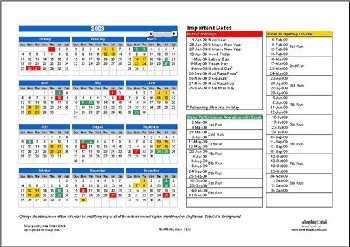
This Excel calendar is created by John Walkenbach, a Microsoft Excel expert. It is developed using formulas (no macros at all) and works in all versions of MS Excel, including the new Excel version 2007.
With permission from John, I have added functionality to the template to highlight the public holidays in red just by entering the dates into the worksheet, and have demonstrated how this can be done by putting in the public holidays of Singapore. The formula is intelligent enough to mark out Monday as a public holiday if that public holiday happens to fall on a Sunday. Take a look at 9 August 2009, Singapore National Day and you will know what I mean.
If you live in another country, all you have to do is to replace the list of public holidays with yours. I have also put in my excel course schedule so that you could see how I use it to highlight our training schedules for next year. Since it is an Excel file, you can create extra copies by saving it with another file name. You can create one for office use, another for personal use, etc.
It is also capable of highlighting dates in a range so that you do not have to enter the dates one by one. All you have to do is to input the Start and End dates and Excel will take care of the rest for you. It’s that easy to use. You don’t have to be an Excel Master to use this template. The minimum requirement to use this template is opening and closing a workbook and enter dates into the cells.
If you like to own a copy of this wonderful Excel template, fill up the form given below. It will be delivered to your mailbox almost instantly. If you don’t need one now, you can download it first and play around with it later. It’s going to show how much more you can do with Excel.
Here’s some feedback from users
Thank You for the templates. I have published a family calendar with all the birthdays for each of the family members for a few years.
I usually have downloaded the MS Excel template and added to it. With your template I have added the birthdays once and now for each year I will be able to produce the calendar without any extra effort.
I am also an Excel fan and had never heard of the array formulas. I am enjoying studying what they can do.
Janice Wallis
“Thanks for the initial Excel Calendar.
Before going away I was busy ‘adapting’ to enable me to produce ‘refills’ for my At-A-Glance Calendar.
This I have managed to do and am very pleased with the result! The only ‘negative’ thing I came across was that when using the conditional formatting for holidays and public dates, etc, if a date happened for both on the same day, one cancelled out the other!
When I have time I will look to how that problem might be overcome!
I am also interested in creating a calendar based on the A4 size month at a glance whereby information for personal birthdays and anniversaries can be entered along with public and bank holidays. I have a current excel programme but it is far too long winded as I did not have the ability to formulate as you have with your programme!
Mike Wilson
“I am extremely pleased with your Excel Calendar Template (ECT). I have not used it for anything (yet), preferring to devour its rich formula construction first, before doing practical stuff with it.
I spent the whole weekend breaking up each formula and recreating it. I had heard about Array Formulas and Conditional Formatting but had never got close to these features. To say that they are powerful is an understatement.
Thank you for introducing me to this template. I am sure I will find several applications for them (I work in a banking/finance environment).
Regards,
Lad
“It is great and extremely useful. I am busy integrating it with a Excel report for sick leave management as to provide a visual calendar representation of sick leave taken by an individual over a twelve month period. This calendar provides the ability to establish sick leave taken on a Monday or Friday, before or after a public holiday as well as on a birthday of the employee or his/her dependants. It is a pity that conditional formatting does not make provision for a fourth condition. I use the public holidays as well as birthdays on the file and changed the school terms to sick leave incidents. I would have loved to include the school terms (but would have used it as school holidays) to see whether sick leave is more prominent during school holidays than during school terms.
I am also using this file for my private use for my university assignments and exams. This is really a great calendar and exactly what I needed.
Thanks a million.
PS. The formulas used in the conditional formatting will also assist me with other work.”Johan Nel
“It was perfect for showing date for training in different hospitals and where they clash. Just need to work out how to add another couple of date grids as we have four hospitals. An exciting addition would be if when clicking on a month you could then go to a month sheet with the days which would allow you to see if the appointments clashed or where just on the same day. We use this in a shared folder so the different teams add their traing dates themselves.
In its current format it stil more than exceeded my expectations.
Quality work.”Colin Lavelle
“Thank you very much for having this information available for people like me. I have adapted the calendar to suit my current work place as well as being able to incorporate a few personal appointments all on the one calendar rather than having separate calendars for each.
With your help also, I was able to adapt the calendar to start the calendar week on the Monday, rather than the Sunday! The information posted was easy to follow, so perhaps you might like to include the adaption for changing the work week to the Monday also for other users, in case they have a similar need to mine.
It’s a fantastic resource, keep up the good work.”Brenda Chance
“It’s been fantastic, I am using the calendar to schedule company travel for supplier audits and also to track certain documentation that my supplier base needs to fill out periodically. What a awesome tool. I am in the process of finalizing it with my modifications and its looking great. I have linked the date fields to be populated from other spreadsheets.
Thank you very much for such a great tool.”Tony Bucchino, Waters Corporation
“I have found the calendar template very useful. With the formulas on the template I was able to produce an annual leave chart for members of staff at my work place (with credit for formulas of course given to EverydayExcel Business Lab). I’ve alse included formulas for bank holidays so that these automatically update with the year change. ALThough the calendar in the template was very well presented, I also found it useful to incorporate a toggle between calendar/financial year.
I now no longer have to sit working out dates for a new calendar at the end of every year!”Jon James
“Jason, it is the best calendar template based on Excel I’ve ever come across. I couldn’t have come close to building one like it. I would only like to see one more function added – if it’s even possible; a fourth box in which to add a category of color-coded important dates.”Bill Stark
“The Excel Calendar template is quite useful. With Singapore holidays and relevant details, it’s an useful tool in just one page for the entire year. Also, it can be used similar ways for years to come!”Pradip Muchhala, ST-NXP Wireless
“Thank you for your Template …. very useful for me to plan my holidays ,and important day like birthday .Use for reminder too. Very Well Formated .. user friendly ..”Goh Siong Ching, Sanyo Electronic Components
“Thanks a lot, Jason! Exactly what I wanted. I only need to tweek the formula a little if I need to add events in the month sheet. Thank you for sharing this tool!”Felicia Lim
“Thank you for the wonderful excel template. It help me on my project that i am doing. This is a great excel template.”Syafri
“I found this excellent and really saved me a lot of time trying to develop one. This is exactly what I needed, and also gave me a greater understanding of formulas.”Sue Caradonna
“Thanks for the excel calendar template. It is very useful and good to track many purpose like Sales Performance, Expenses, Budget, Program or events for the whole of 2009.”Fiona Soh
“I have been using it to make personalized calendars, since in Portugal, besides the national holidays some towns have their own holidays which are not marked in the standard calendars.
I need that information because of my work since frequently I have to contact people in other towns.
Furthermore, I have to keep track of some colleagues holidays. Having all that information in a single calendar is very useful to me.”Lensman
“I modified the calendar to display RED/ YELLOW/ GREEN for days of the week where the number of people scheduling vacation could be easily identified by all of the managers and supervisors. Red indicated the number of people scheduled for the day had met or exceeded the daily threshold. Yellow, indicated the number was approaching the threshold. And green indicated there were still positions open for scheduling vacation. This will prove to be quite handy in our workforce analysis.
Thank you for sharing!”Rich
“It is great ; I am using it to show a full view of my appointments and commitments.”Christian Labezin
“It’s been great. Simple and user-friendly. Its a good find for anyone who needs an excel template like this.”Dawn Lee
“It is quite useful to plan monthly working as one can plan for monthly work according to the dead lines.”AS
“The monthly excel calender which was received from your company is very good and useful for our daily ones. this product is good and has a good future in the market.”J.P.Krishna Prasad
“ALThough I use Excel every day, I have never used Styles and that is something I intend to start using from now on. I have never had any Excel training and like most people am self taught. But Excel is so full of amazing features that I’m sure that I could save time if I knew of some of the more advanced tools. While programming skills and VBA obviously add much value to Excel, I can see that there are sufficient functions to do many things without that knowledge.
Once again many thanks for the spreadsheet.”Jonathan Perez
“First of all thank you very much for sending me excel calender template, it is really nice creation, you have done very good job.
I’m using it for my routine time schedule, basically I’m very busy man and most of my time is spending in meetings, so in this regards, I’m getting much more help with this calender.”ARK
[thrive_lead_lock id=’2901′]Hidden Content[/thrive_lead_lock]
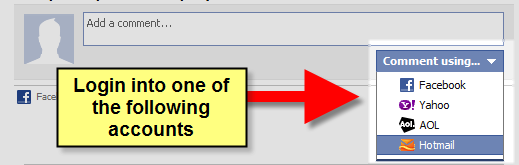
New! Comments
Have your say about what you just read! Leave me a comment in the box below.
Share this page:
Enjoy this page? Please pay it forward. Here’s how…
Would you prefer to share this page with others by linking to it?
- Click on the HTML link code below.
- Copy and paste it, adding a note of your own, into your blog, a Web page, forums, a blog comment, your Facebook account, or anywhere that someone would find this page valuable.
<a href=”http://www.advanced-excel.com/”>Advanced Excel – From a Business Perspective</a><a href=”http://www.advanced-excel.com/”>Advanced Excel – From a Business Perspective</a>

Excel Courses for Business Professionals
Copyright © advanced-excel.com 2007 – 2019. All Rights Reserved. Privacy Policy
Microsoft® and Microsoft Excel® are registered trademarks of Microsoft Corporation.
advanced-excel.com is in no way associated with Microsoft
