Calculate Profit Breakeven Using Goal Seek
Breakeven is a financial term to describe a business or project where the sales revenue is equal to total expenses. It is simple to calculate if the expenses incurred are fixed, i.e. it does not change as the revenue changes. But in most projects/businesses, this is not the case. The expenses usually make up of a fixed component and variable component.
The existence of variable expenses complicates the calculation of breakeven point. This is because the variable
cost will increase as the number of units sold increases. The answer can be calculated by working out the total gross profit of the unit sold to be equal to the total fixed expenses.
If the unit cost of the variable expenses changes not by equal amount with every unit sold (could be due to step cost, i.e. the cost increases only when it reaches certain quantity, e.g. quantity discount given), then the breakeven calculation would become much more complicated.
In the example below, the net profit decreases by $72 because the step cost increases from $150 to $250 when it hits the 20 unit mark. Then the profit increases by $28 when the quantity sold increases from 20 to 21.
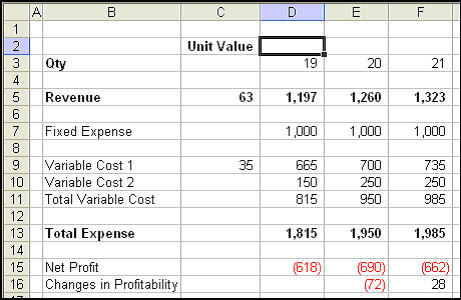
You can use Excel to create multiple columns to find out the breakeven quantity for the project. And Excel can replicate the model quickly if you know how to use absolute reference to make the formula reference to the unit value column as the model is copied across columns.
But there is an even easier way to find the answer. That is to use Goal Seek, an Excel function provided by Excel. Here is how to use Goal Seek to find the breakeven point.
- From the menu, select Tools -> Goal Seek.
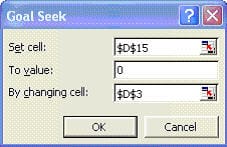
- Fill in the boxes as shown below:
- Set Cell is reference to the net profit cell D15.
- To Value is to instruct Goal Seek to set the net profit to zero by changing the value in certain cell, which in our example is the quantity. (You can use goal seek to find out other net profit targets too)
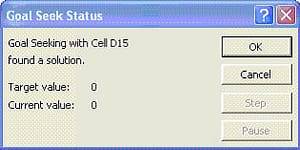
- Click OK and Excel will return the status of test. In our example, a solution was found. The quantity is 52.
Note: If Goal Seek cannot find a solution the first time, you can try again. You may be surprised to find a solution when you run Goal Seek the 2nd or 3rd time.