













Run excel macro using an icon
Run excel macro is very easy. There are many ways to run the macro. Given below are some methods which you could use to run the macro:
1. Go to menu, click on tools, –> macro –> macros. When the Macro dialog box appears, select the macro and click on the run button.2. Activate the control toolbox toolbar. Click on the icon to create a button. Draw the button to the desired size. Point the mouse at the edge of the button and click on the right mouse
button. In the pop-up menu, select assign macro and select the macro to attach to this button. Click OK and click away from the button. The button is now assigned to the button. You can use the assign macro method on most the objects in Excel such as pictures, auto shape, etc.
3. Use a short cut key (e.g. Press the CTRL key together with a character) to run excel macro. You can set up the short cut key when you start recording a macro. If you have created the macro, you can set the short cut key by going to menu, click on tools, –> macro –> macros. When the Macro dialog box appears, select the macro and click on the option button.
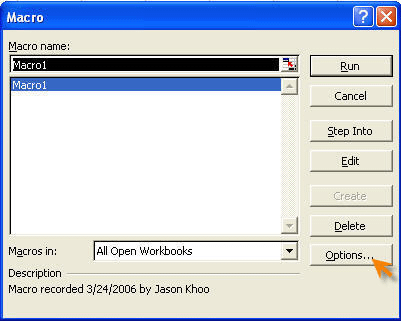
4. In the following section, we will show you how to assign the macro to an icon so that the macro can be run by clicking on the icon. We will use the macro which we have created in the tutorial �record a macro� for this tutorial.
a. Click on the right mouse button.
b. Select Customize.
c. Go to the Command Tab, select the Category called Macros.
d. Go to list on the right side of the dialog box called Commands. Select Custom Button / Icon
e. Drag it to the formatting toolbar.
f. To modify the button image, click on the modify selection on the Customize Dialog Box, go to change button image. Select your preferred image.
g. Go to modify selection again and select assign Macro.
h. Select the Macro named �Custom_Num_Format� and click OK.
i. Close the Customize Dialog Box.
j. Enter some numbers into the worksheet and test out your new macro
k. Once you have done the above steps, you will be able to run excel macro using the icon.
New! Comments
Have your say about what you just read! Leave me a comment in the box below.
Share this page:
Enjoy this page? Please pay it forward. Here’s how…
Would you prefer to share this page with others by linking to it?
- Click on the HTML link code below.
- Copy and paste it, adding a note of your own, into your blog, a Web page, forums, a blog comment, your Facebook account, or anywhere that someone would find this page valuable.
<a href=”http://www.advanced-excel.com/”>Advanced Excel – From a Business Perspective</a><a href=”http://www.advanced-excel.com/”>Advanced Excel – From a Business Perspective</a>

Excel Courses for Business Professionals
Copyright © advanced-excel.com 2007 – 2019. All Rights Reserved. Privacy Policy
Microsoft® and Microsoft Excel® are registered trademarks of Microsoft Corporation.
advanced-excel.com is in no way associated with Microsoft