














How to install Excel addin
To install the addin, first go to menu -> Add-Ins
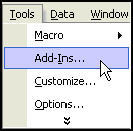
If you are trying to install an add-in in another location, you can click on the browse button in the add-in dialog box to find the add-in.
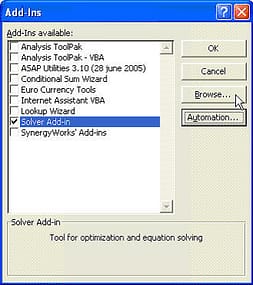
Locate the folder that stores your add-in, select the add-in and click OK with the left mouse button.
Once the add-in is listed in the list of Add-ins dialog box, place a check on the add-in and click ok.
The macros and custom functions in the add-ins will be available for use in your computer.
New! Comments
Have your say about what you just read! Leave me a comment in the box below.
Share this page:
Enjoy this page? Please pay it forward. Here’s how…
Would you prefer to share this page with others by linking to it?
- Click on the HTML link code below.
- Copy and paste it, adding a note of your own, into your blog, a Web page, forums, a blog comment, your Facebook account, or anywhere that someone would find this page valuable.
<a href=”http://www.advanced-excel.com/”>Advanced Excel – From a Business Perspective</a><a href=”http://www.advanced-excel.com/”>Advanced Excel – From a Business Perspective</a>

Excel Courses for Business Professionals
Copyright © advanced-excel.com 2007 – 2019. All Rights Reserved. Privacy Policy
Microsoft® and Microsoft Excel® are registered trademarks of Microsoft Corporation.
advanced-excel.com is in no way associated with Microsoft