Home Tips & Tricks
 Excel Functions
 Excel Formulas
 Applied Formulas
 Applied Functions
 Excel Macros
 Business Uses
 Downloads
 Excel Tests
 Latest Updates
 Recent Posts
 About us
 Q&A
Q&A
REVOLUTIONALIZING EXCEL BUDGETING
A survey related to Excel Budgeting conducted by Adaptive Planning in Nov 2006 revealed that 78% of the respondents use spreadsheets as their company primary budgeting and forecasting tool. This phenomenon is not limited to only small and medium companies. It’s noted that amongst the large companies, 68% rely primarily upon spreadsheets as their budgeting and forecasting tool.
Despite the number of limitations in using Excel as a budgeting tool and the availability of Business Performance Management Systems (BPMs) in the market, the host of benefits offered by Excel in budgeting continued to be unrivalled. BPMs overcome some of the limitations of Excel but eroded the advantages of Excel at the same time. Hence, many budget managers choose to overlook the Excel limitations (such as cell links across workbooks) and enjoy the benefits of using Excel as a budgeting tool.
As previous budget managers, we have gone through the same pains and could understand and identify the needs and wishes of every budget manager who are using Excel as a budgeting tool and looking for solutions to undermine its limitations. We have concertedly diverted some of our resources from our key activities to research and work on fulfilling those unmet needs. And today, we are excited to see the results — a breakthrough in removing each of those Excel limitations while preserving all the benefits of the current excel budgeting method. In other words, we have a revolutionary solution that enhances the existing way of Excel budgeting!
THE 3 BREAKTHROUGHS AND 8 BENEFITS IN OUR EXCEL BUDGETING APPROACH
Breakthrough # 1:
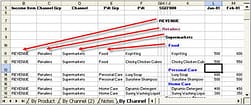
JUST by using formulas, we are able to align the headers and sub-headers to the budget numbers. This means that each set/line of the budget numbers has its own classification, be it the header, sub header, product categories, etc. Unlike linked cells where we have to manually specify the description we have to point, our formulas are intelligent enough to detect which header and sub-header each budget line belongs to.
Benefits #1:
This means that every budget manager has total control over the layout of the template. Budget managers can easily customise the template to their organisation needs.
Benefits #2:
Budget users can re-arrange the row layout of the budget items and budget managers can still easily capture the inputs into their consolidated worksheet. All they have to do is to populate the formula in the first row to the remaining rows in the template and the headers & sub-headers are re-aligned to the new layout.
Benefits #3:
Budget users no longer have to keep separate worksheets for their own workings and for submission.
Breakthrough # 2:
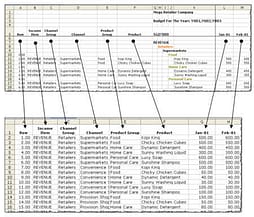
JUST by using formulas and not cell links, the details in the template can be easily transferred to another worksheet. Updates to the numbers usually take less than one minute.
Benefits #4:
Budget managers and users can make use of the database to create pivot tables and perform analysis on their budgeted numbers. With pivot tables, budget managers and users can analyse the numbers from more than one perspective (e.g. by distribution channels followed by product groups or vice versa).
Breakthrough #3:
We can consolidate the numbers provided by each budget users (e.g. business units, departments, countries) into a worksheet using a relative unknown function which existed even in older versions of Excel such as Office 2000. It is not a macro and yet it has the power to automatically update the budget numbers when the consolidated workbook is opened (Note: Only one worksheet is needed to perform the consolidation).
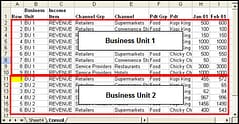
Benefits #5:
The details from the respective departments, business units or countries are not lost during consolidation.
Benefits #6:
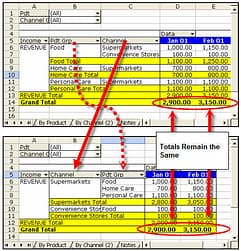
We could still use pivot table to analyse the consolidated budget numbers and do detailed comparison of the budget numbers provided. Given are just two of the many ways you could analyse the budget numbers.
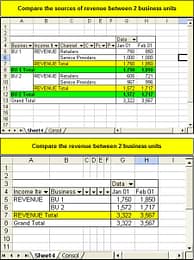
Benefits #7:
Reporting and presenting of the budget numbers becomes a breeze when you use pivot table as the source. It does not matter anymore which row the set of budget numbers is located. The row location can even change over time and the set of budget numbers you want will always be presented in the report or chart. This feature is available only in Office 2002 and above.
Benefits #8:
Budget managers can create each chart within a minute. And these charts can be set up such that they can be updated automatically upon opening or at regular interval. New data will be added automatically and old records are deleted when it detects that the record has been removed from the source.
Conclusion
This Revolutionary Breakthrough in Excel Budgeting is able to achieve a whopping time saving of up to 70% in the current Excel budgeting method. A lot more time can be freed up to perform analysis on the budgeted numbers and produce better quality results which otherwise could not be done due to time constraints. To get a preview of this up-coming course, fill in your ontact details below and we will inform you of the preview dates once they are finalised.
We will be organising a preview for the course at the end of February 2008 in Singapore. If you would like us to inform you about course preview dates, please drop us an email using the signup box given below.
New! Comments
Have your say about what you just read! Leave me a comment in the box below.
Share this page:
Enjoy this page? Please pay it forward. Here’s how…
Would you prefer to share this page with others by linking to it?
- Click on the HTML link code below.
- Copy and paste it, adding a note of your own, into your blog, a Web page, forums, a blog comment, your Facebook account, or anywhere that someone would find this page valuable.
<a href=”http://www.advanced-excel.com/”>Advanced Excel – From a Business Perspective</a><a href=”http://www.advanced-excel.com/”>Advanced Excel – From a Business Perspective</a>

Excel Courses for Business Professionals
Copyright © advanced-excel.com 2007 – 2019. All Rights Reserved. Privacy Policy
Microsoft® and Microsoft Excel® are registered trademarks of Microsoft Corporation.
advanced-excel.com is in no way associated with Microsoft